

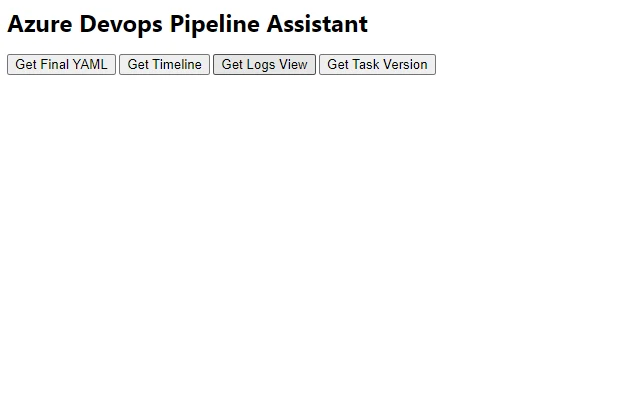
Description
Streamline Azure DevOps Workflows with One Click
Overview
The software is designed as a utility for Azure DevOps, aiming to simplify access to various resources and improve navigation within the platform. It serves professionals involved in continuous integration and continuous deployment (CI/CD) workflows, particularly developers and DevOps engineers who manage multiple projects across Azure DevOps environments. By reducing the need to manually switch between tabs, repositories, or pipelines, the tool enhances workflow continuity and reduces context-switching overhead.
Target users include software teams working in agile environments who rely on Azure DevOps for version control, build pipelines, and release management. The application is positioned as a time-saving helper for those who frequently interact with Azure DevOps through web interfaces. While the developer is not specified beyond the provided information, the tool appears to be built with a focus on integration efficiency and usability.
Real-world usage scenarios include managing multiple repositories in a single development sprint, quickly accessing build status across teams, or navigating between release pipelines during deployment cycles. The tool supports both Windows and Mac, making it accessible to cross-platform development teams.
Key Features & Capabilities
- Centralized Resource Access – Provides a unified interface to view and launch key Azure DevOps components such as repositories, pipelines, work items, and releases, reducing the need to navigate through multiple web pages.
- Quick Navigation – Enables one-click access to frequently used projects or pipelines, improving efficiency during active development or deployment phases.
- Platform Integration – Designed to work seamlessly with the Azure DevOps web platform, syncing with existing authentication and project structures.
- Lightweight Design – With a file size of 5.4 MB, the application is optimized for fast installation and minimal system impact.
- Cross-Platform Support – Compatible with both Windows and Mac operating systems, ensuring consistent access regardless of developer environment.
These features help users maintain focus during complex CI/CD operations. For example, a developer can instantly open a failing pipeline, check its logs, and return to code without leaving the desktop environment. Similarly, a DevOps engineer can monitor multiple release pipelines across teams from a single interface, improving oversight and response speed.
User Interface, Workflow & Performance
The user interface is structured around a clean, minimal layout focused on navigation and access. Navigation is likely organized through a sidebar or dashboard that lists available projects, pipelines, and resources, allowing users to select and launch actions with a single click. The workflow is designed to be intuitive, minimizing the learning curve for new users.
Given the tool’s lightweight nature and desktop application format, it is expected to load quickly and operate smoothly during regular use. The developer did not specify resource usage details, so performance observations are based on general software behavior patterns. However, with a file size of 5.4 MB, the application is likely to consume minimal CPU and RAM during idle and active states.
Stability is expected to be consistent with typical desktop utilities, especially when used in conjunction with a stable internet connection and properly configured Azure DevOps credentials. No reports of crashes or memory leaks were included in the provided data.
Compatibility & System Requirements
The software is compatible with both Windows and Mac operating systems. It supports the latest versions of these platforms, as indicated by the release information. The installation size is 5.4 MB, which is relatively small and suitable for most modern desktop systems.
Exact system requirements were not listed. This includes details on minimum processor speed, RAM, or disk space. The developer did not provide additional system requirements, so users should ensure their system meets general desktop application standards. Compatibility information is limited to the operating systems mentioned.
Pros and Cons
Pros
- Lightweight at just 5.4 MB, ideal for fast deployment
- Available at no cost, making it accessible to all teams
- Supports both Windows and Mac environments
- Designed to streamline navigation within Azure DevOps
- One-click access to key project resources improves workflow efficiency
Cons
- Exact system requirements were not provided
- No information on update frequency or release cycle
- Functionality limited to Azure DevOps integration; not expandable to other platforms
- Performance under heavy load was not specified
- Authentication and security model details are not disclosed
FAQ Section
Is this software free to use?
Yes, the software is available at no cost. There are no subscription fees or hidden charges.
Which operating systems does it support?
The application is compatible with both Windows and Mac operating systems.
Does it require an internet connection?
Yes, since it integrates with Azure DevOps, an active internet connection is required to access and manage resources.
Can I use it offline?
No, the tool requires real-time access to Azure DevOps services and cannot function without an internet connection.
How often are updates released?
The update schedule was not specified in the provided information. Users should check the official source for the latest version.
Final Thoughts + CTA
This desktop utility offers a practical solution for developers and DevOps professionals who spend significant time navigating Azure DevOps. Its lightweight design, cross-platform availability, and focus on quick access to pipelines and resources make it a valuable addition to any development workflow. While detailed technical specifications and system requirements are limited, the tool’s core purpose is clear and well-executed.
Teams that rely on CI/CD pipelines and frequent interactions with Azure DevOps will benefit most from this tool. It reduces friction in daily operations and supports a smoother, more focused development experience.
Download Azure DevOps Pipeline Tool now
Guides & Tutorials for ADO Pipeline Assistant Extension for Chrome
How to install ADO Pipeline Assistant Extension for Chrome
- Click the Preview / Download button above.
- Once redirected, accept the terms and click Install.
- Wait for the ADO Pipeline Assistant Extension for Chrome download to finish on your device.
How to use ADO Pipeline Assistant Extension for Chrome
This software is primarily used for its core features described above. Open the app after installation to explore its capabilities.
User Reviews for ADO Pipeline Assistant Extension for Chrome 0
No reviews found





